

Agentic Canvas
Design with your AI agents on one infinite canvas.
Category
Recommended for
- Solo / Indie
- Pre-Seed
SSIE
Stage Fit Recommendations
Following data shows why Agentic Canvas is recommended for listed teams. The Fit Score represents the percentage fit of Agentic Canvas to each company stages, as calculated by the SSIE.
Stage
Fit Score
Fit Reasons
Solo / Indie
$0–$2,000 MRR
92- Visual editing writes real HTML and CSS
- Open the canvas without creating an account
- Free plan covers a solo founder at no cost
Pre-Seed
$0–$10k MRR
90- Connect Claude, ChatGPT, Codex and Cursor
- Export designs as HTML PNG SVG or PDF
- AI agents edit the open canvas live
- Free plan covers about 2 users at no cost
Description
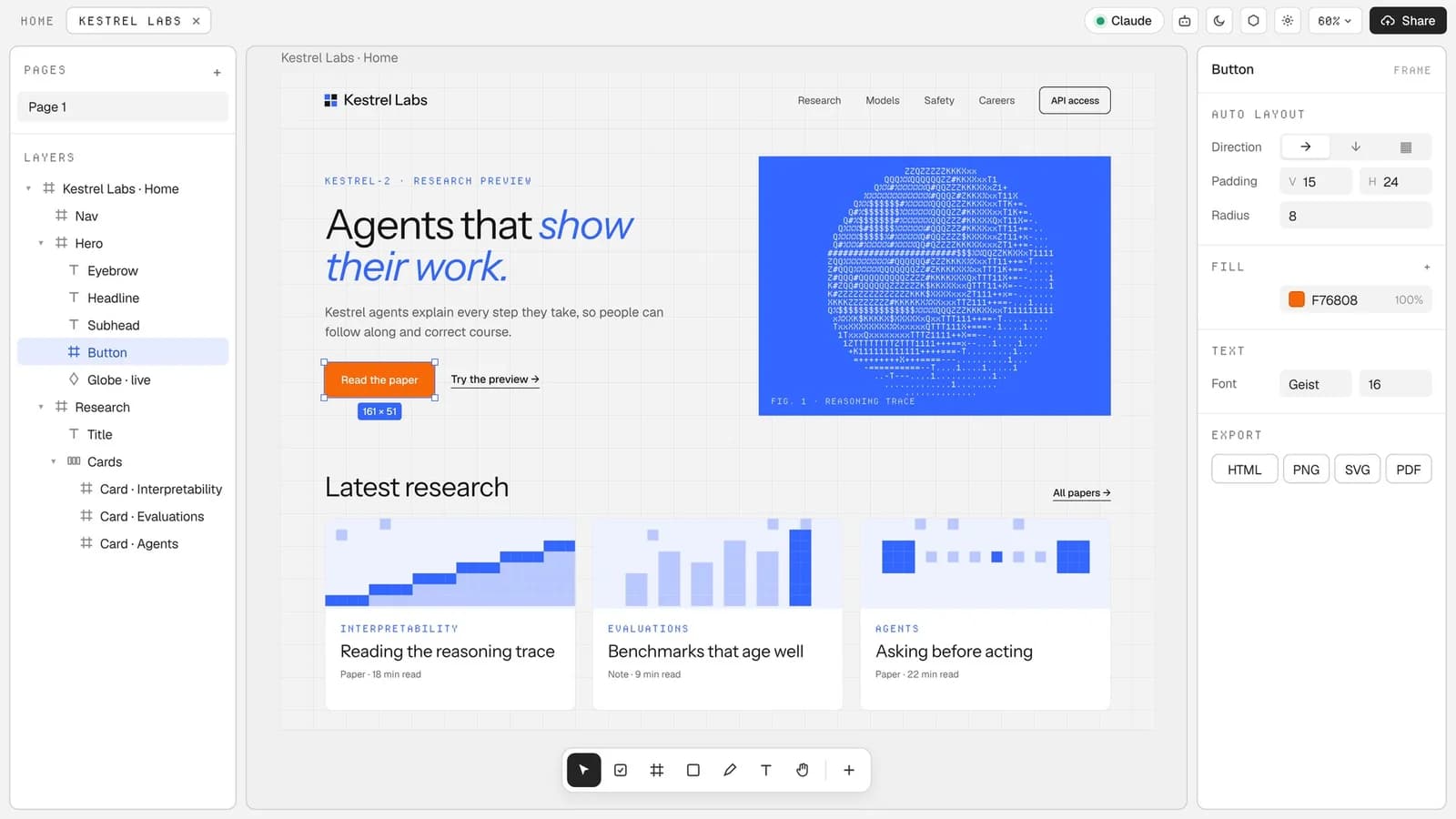
Agentic Canvas is an infinite design canvas purpose-built for working with AI agents. It is marketed as a free alternative to Figma for agent-driven design workflows. Users can paste HTML, SVG, PNG, or copy from Figma directly onto the canvas. AI agents such as Claude, ChatGPT, Cursor, Codex, or any MCP client can read and write to the canvas. Every edit made on the canvas corresponds to real HTML and CSS code that agents can understand. The tool provides full visual editing features including layers, an inspector, and color variations. Designs can be exported, published, or shared. Pricing is per team, includes unlimited agent seats, and offers a free tier.

FAQs
Yes. Agentic Canvas is a free browser-based design canvas and does not require an account. Your designs stay in the browser on your device until you choose to export, share or publish them.
Yes. You can connect Claude, ChatGPT, Codex, Cursor or another MCP-compatible agent. The agent can read and change the open canvas while you see its edits and can undo each write.
Yes. Every frame is real HTML and CSS rather than a static image. Interactive states such as animations, charts and hover effects can work directly in the canvas.
Yes. You can copy and paste from Figma, paste HTML, or drop design files and images onto the canvas, then refine the result visually with layers and the inspector.
Pricing
Paste your product url
Live within 24 hours.
Free. No credit card.
Reviewed by a human. SSIE Fit Scoring.
Explore similar products

marked.dev
Save interfaces and motion you love from the web, and let your AI coding agent build in your taste.

redu.cloud
Agent-native cloud for deploying and operating infrastructure through AI agents.

OpenLLM
API keys, local models and subscriptions in every agent

LightPDF
AI-powered PDF editor, converter, and reader for document workflow simplification.
Coolors.co
Generate and explore color palettes for design projects with accessibility checks and real-time visualization.

Libraries.dev
Seven open-source React effects for AI interfaces, ready for modern apps.

UiChemy
Convert Figma designs, AI builds, or prompts into native, editable WordPress sites.

MausBot
Open source Grok Bot: your own team of AI bots in a chat app, on your own machine.

Details.so
A curated directory of web design inspiration with copy-ready code snippets.

Shipper.now
Build complete apps by messaging AI without coding or designing.
Explore similar products
marked.dev
Save interfaces and motion you love from the web, and let your AI coding agent build in your taste.
redu.cloud
Agent-native cloud for deploying and operating infrastructure through AI agents.
OpenLLM
API keys, local models and subscriptions in every agent
LightPDF
AI-powered PDF editor, converter, and reader for document workflow simplification.
Coolors.co
Generate and explore color palettes for design projects with accessibility checks and real-time visualization.
Libraries.dev
Seven open-source React effects for AI interfaces, ready for modern apps.
UiChemy
Convert Figma designs, AI builds, or prompts into native, editable WordPress sites.
MausBot
Open source Grok Bot: your own team of AI bots in a chat app, on your own machine.
Details.so
A curated directory of web design inspiration with copy-ready code snippets.