

M3E Canvas
A UI/UX design tool for creating and linking Material 3 screens with AI coding prompt generation.
Recommended for
- Solo / Indie
- Idea-Stage
- Pre-Seed
SSIE
Stage Fit Recommendations
Following data shows why M3E Canvas is recommended for listed teams. The Fit Score represents the percentage fit of M3E Canvas to each company stages, as calculated by the SSIE.
Stage
Fit Score
Fit Reasons
Solo / Indie
$0–$2,000 MRR
92- Sketches Material 3 Expressive app screens
- Free browser tool with no account
- Free plan covers a solo founder at no cost
Idea-Stage
$0
92- Starts in browser without installation
- Prompts work with Claude Code and Codex
- Free plan covers 1 user at no cost
Pre-Seed
$0–$10k MRR
90- MIT license permits commercial software use
- Share links reopen designs on another canvas
- Open issues and pull requests for product changes
- Free plan covers about 2 users at no cost
Description
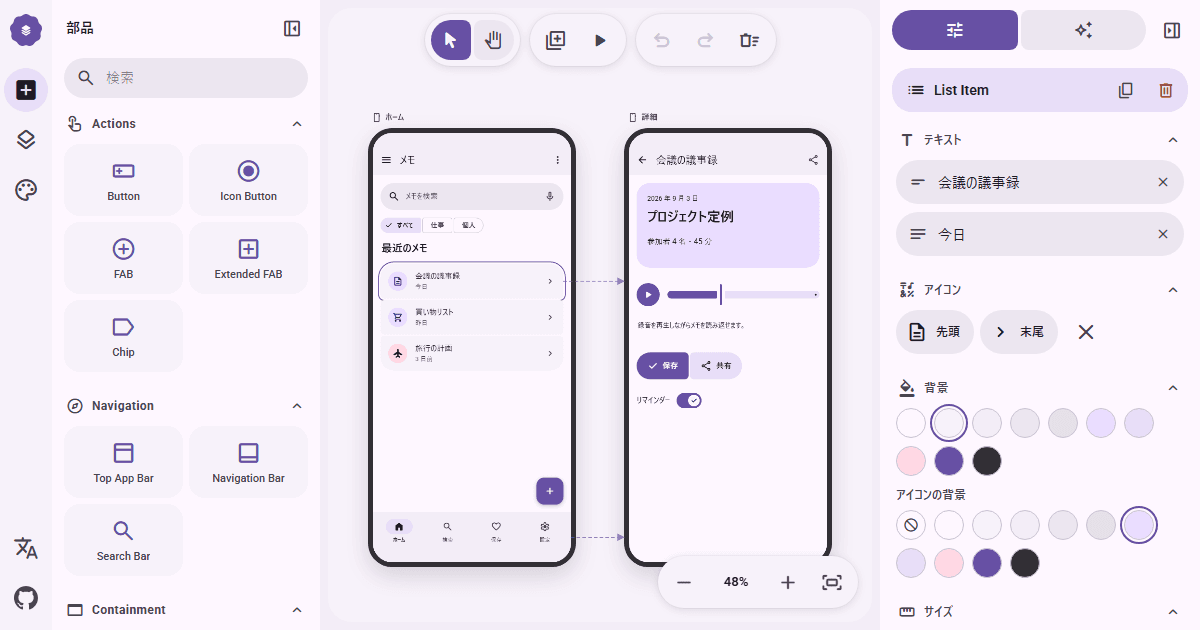
M3E Canvas is a UI/UX design tool for creating Material 3 expressive screens. It enables designers to link screens, preview them in real-time, and generate prompts for AI coding tools. The platform includes design features such as layers, color palettes, text fields, and animations. Users can export prompts compatible with AI coding assistants to streamline the design-to-code workflow. A beta AI integration feature allows automated code generation directly from designs. The tool supports screen linking and real-time preview to enhance prototyping efficiency. Design elements like buttons, navigation components, and progress indicators are accessible through the interface.

FAQs
Yes. M3E Canvas lets you assemble Material 3 Expressive screens, connect and preview their navigation, then copy a structured prompt for tools such as Claude Code, Codex, Gemini CLI or Cursor.
No. M3E Canvas is free, open-source and runs in your browser without an account, product server or installation. Its MIT license applies, and the project states that no feature is gated behind sponsorship.
Yes. You can link tappable components to other screens, choose transitions, and preview tap or swipe navigation. The canvas also supports phone and desktop layouts, layers, groups and scrolling screens.
Not for its standard canvas workflow. Designs stay in browser storage. If you enable the optional AI helper, the generated design description is sent directly from your browser to the provider you select using your own API key.
Paste your product url
Live within 24 hours.
Free. No credit card.
Reviewed by a human. SSIE Fit Scoring.
Explore similar products

60fps
60fps provides UI/UX animation inspiration for mobile and web apps.

UI Skills
UI Skills is a collection of design-engineering skills for accessibility, motion, frontend craft, and interface quality.

Brik
An agentic platform for creating and scaling interactive design tools without coding

CodeFronts
A free library of CSS components, generators, and frontend tools for developers and designers.

Componentry
Animated React UI components with pre-built styling and motion, using Tailwind CSS, TypeScript, and Framer Motion.

Toolcraft
Build custom design apps with AI using an open-source UI library and starter kit.

Sketch
Design, prototype, collaborate and handoff

CG Boost
Clear, fun, and practical Blender courses for 3D storytellers.
Explore similar products
60fps
60fps provides UI/UX animation inspiration for mobile and web apps.
UI Skills
UI Skills is a collection of design-engineering skills for accessibility, motion, frontend craft, and interface quality.
Brik
An agentic platform for creating and scaling interactive design tools without coding
CodeFronts
A free library of CSS components, generators, and frontend tools for developers and designers.
Componentry
Animated React UI components with pre-built styling and motion, using Tailwind CSS, TypeScript, and Framer Motion.
Toolcraft
Build custom design apps with AI using an open-source UI library and starter kit.
Sketch
Design, prototype, collaborate and handoff