
Dina
Dina records your screen and refines it automatically for presentation-ready videos on macOS.
Recommended for
- Solo / Indie
- Idea-Stage
- Pre-Seed
SSIE
Stage Fit Recommendations
Following data shows why Dina is recommended for listed teams. The Fit Score represents the percentage fit of Dina to each company stages, as calculated by the SSIE.
Stage
Fit Score
Fit Reasons
Solo / Indie
$0–$2,000 MRR
70- Captures screen, audio, camera, cursor, and keystrokes in one take
- Records your screen and refines it automatically
- Zooms automatically into key interactions to keep viewers focused
Idea-Stage
$0
86- Trims, splits, and zooms via full timeline and transcript control
- Adds arrows, highlights, shapes, and callouts directly into video
- Generates transcripts automatically with fine-tunable captions
Pre-Seed
$0–$10k MRR
72- Masks sensitive information with flexible multi-region masking
- Builds cohesive scenes from titles, slides, images, and video
- Records voiceovers directly in the timeline
Description
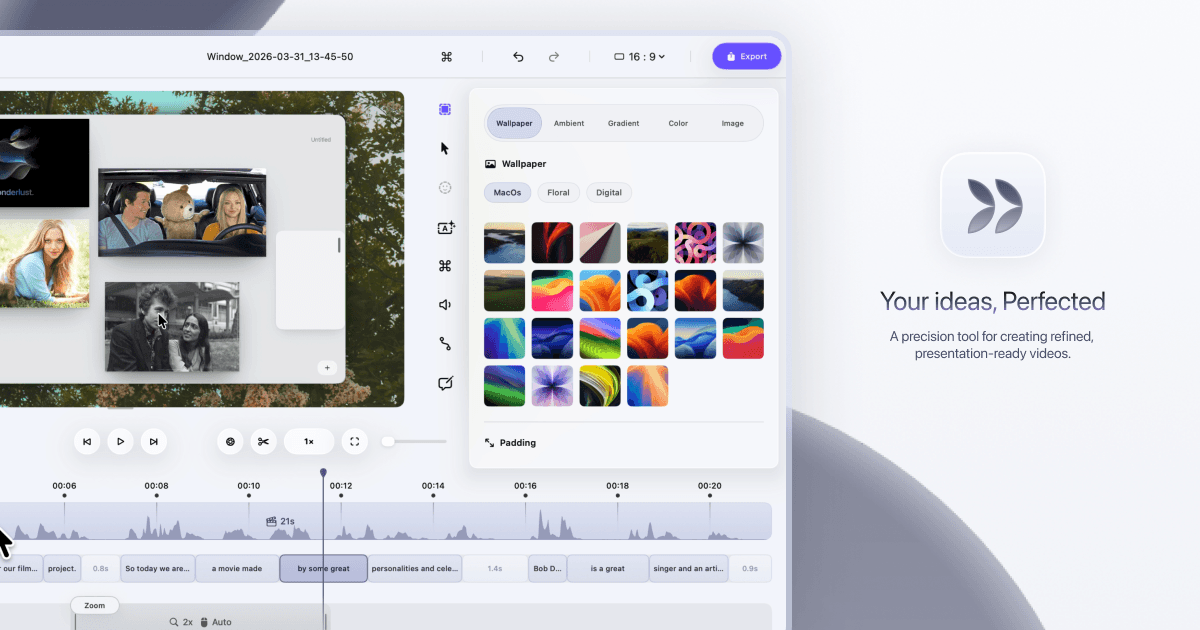
Dina is a macOS application for creating polished screen recordings with AI-assisted refinement. It automatically zooms into key interactions, helping audiences follow what matters. The tool captures screen, audio, camera, cursor, and keystrokes in a single take. Users can trim, split, zoom, and refine videos using a full timeline and transcript control. Dina delivers studio-quality output with 4K resolution, multiple formats, and fast rendering. Backgrounds, cursor effects, layouts, and camera settings are designed to make every frame look intentional. The app requires macOS Sequoia 15.0 or later.

FAQs
Yes. Dina works completely offline, including its AI features, which run on-device using Core ML. Recordings are saved locally, and no account or cloud connection is required.
Dina's Mac licence is a one-time $58 purchase per device, not a subscription. The licence includes lifetime use, free updates and access to all features.
Yes. Dina automatically zooms into key interactions and smooths cursor movement. Its transcript-based editor also lets you remove fillers and silence by editing the recording's text.
Yes. Dina supports connecting your own Vercel Blob or Amazon S3 storage to upload recordings and create shareable links. The storage credentials are kept in your Mac's Keychain.
Dina is a native macOS app for Apple Silicon and requires macOS Sequoia 15.0 or later. It does not offer a Windows version.
Pricing
Paste your product url
Live within 24 hours.
Free. No credit card.
Reviewed by a human. SSIE Fit Scoring.
Explore similar products

Gifox for Mac
Gifox for Mac is a simple GIF maker app to create high-quality animated GIFs from screen and videos.

GEOMETRIC
GEOMETRIC converts images, videos, and audio into geometric art using contours, nodes, and scanlines.
DaVinci
Generate and edit AI images and videos with top models in one platform

Presentations.AI
AI presentation platform that turns ideas and documents into professional slide decks

StarryKit
AI-powered workspace for creating and refining visual designs from prompts for marketers, designers, and creators

GifNoBg
GifNoBg – Free All-in-One GIF Maker, Editor & AI Creative Toolkit

Everygen AI
Browser-based text-to-video, image-to-video, and text-to-image creation
HomeDesignsAI
AI home design tool trusted by 2.80M+ users. Transform interiors, exteriors, and gardens in seconds with 200+ styles.

Scape
An AI email client that proactively drafts replies and surfaces what matters for professionals.

MiniMax H3
Browser MiniMax H3 studio for 4-15s text or image to video in 768P or 2K with stereo audio.
Explore similar products
Gifox for Mac
Gifox for Mac is a simple GIF maker app to create high-quality animated GIFs from screen and videos.
GEOMETRIC
GEOMETRIC converts images, videos, and audio into geometric art using contours, nodes, and scanlines.
DaVinci
Generate and edit AI images and videos with top models in one platform
Presentations.AI
AI presentation platform that turns ideas and documents into professional slide decks
StarryKit
AI-powered workspace for creating and refining visual designs from prompts for marketers, designers, and creators
GifNoBg
GifNoBg – Free All-in-One GIF Maker, Editor & AI Creative Toolkit
Everygen AI
Browser-based text-to-video, image-to-video, and text-to-image creation
HomeDesignsAI
AI home design tool trusted by 2.80M+ users. Transform interiors, exteriors, and gardens in seconds with 200+ styles.
Scape
An AI email client that proactively drafts replies and surfaces what matters for professionals.