

Gifox for Mac
Gifox for Mac is a simple GIF maker app to create high-quality animated GIFs from screen and videos.
Recommended for
- Solo / Indie
- Idea-Stage
- Pre-Seed
- Seed
SSIE
Stage Fit Recommendations
Following data shows why Gifox for Mac is recommended for listed teams. The Fit Score represents the percentage fit of Gifox for Mac to each company stages, as calculated by the SSIE.
Stage
Fit Score
Fit Reasons
Solo / Indie
$0–$2,000 MRR
92- Record a selected screen area or window
- Download the app free from its website
- Free Basic plan covers a solo founder at no cost
Idea-Stage
$0
92- Record and edit screen GIFs on macOS
- Buy a lifetime license with no subscription
- Free Basic plan covers 1 user at no cost
Pre-Seed
$0–$10k MRR
91- Adjust GIF export settings after recording
- Receive priority support with Co-founder license
- Free Basic plan covers about 2 users at no cost
Seed
$10k–$100k MRR
88- Export without a watermark on Pro
- Get Gifox from the Mac App Store or Setapp
- Free Basic plan covers about 3 users at no cost
Description
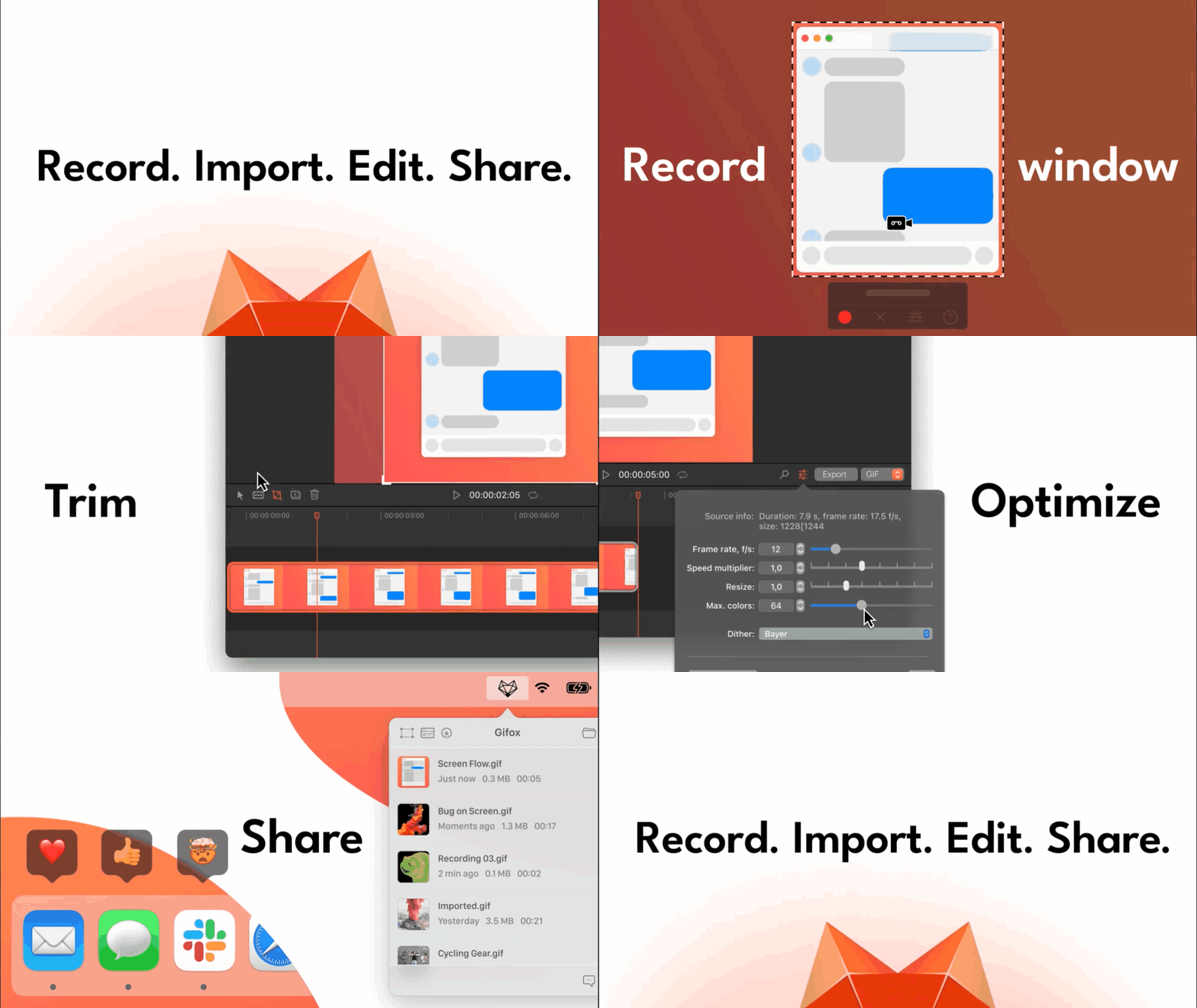
Gifox for Mac is a simple GIF maker app to create high-quality animated GIFs from screen and videos. It allows users to record, convert, capture, edit, compress, and optimize GIFs. The app offers selection modes for custom and window capture, a status bar menu for recording and importing, and an integrated editor for cropping, trimming, and re-exporting videos. Users can control capture settings such as mouse, keyboard, and desktop picture recording. The app also provides compression control options for playback, colors, resizing, and dithering. Gifox is available as a free version with a 10-second recording limit and a watermark, and a Pro version with unlimited recording and watermark removal.

Pricing
Explore similar products

ScreenBuddy
Polished screen recordings for Windows. Also on Mac.

Riverside
AI-powered platform for recording, editing, repurposing, and distributing studio-quality podcasts and videos

Clueso
Clueso turns rough screen recordings into polished videos and guides with AI automation
Screen Bolt
Professional screen recordings with macOS editing tools for creators

Snapr
Snapr: Your paid solution for seamless screen-recording and video-editing productivity.

Motion.software
Modern screen recorder for Windows

Cap
Open source screen recorder for Mac, Windows, and Linux with instant and studio recording modes, editing tools, and
Animated gif tools
Online animated GIF maker and image editor for creating and editing GIFs, videos, and images
Explore similar products
ScreenBuddy
Polished screen recordings for Windows. Also on Mac.
Riverside
AI-powered platform for recording, editing, repurposing, and distributing studio-quality podcasts and videos
Clueso
Clueso turns rough screen recordings into polished videos and guides with AI automation
Screen Bolt
Professional screen recordings with macOS editing tools for creators
Snapr
Snapr: Your paid solution for seamless screen-recording and video-editing productivity.
Motion.software
Modern screen recorder for Windows
Cap
Open source screen recorder for Mac, Windows, and Linux with instant and studio recording modes, editing tools, and